
Overflow
VR Programmer
Overflow is a VR flood simulator that aims to spread the awareness of flash flood and educate people on what to do during a flood.
This is a final year project which consists of five people in a team. There are three visual designers and two programmers. Ashley is one of the programmers that helped to build this simulator.
For more details:


Contributions
Ashley is one of the programmers of the Ooohana team. She is in charge of the interactions on the first floor and the first stage of the gameflow. In the beginning of the project, she had very little knowledge on Unity and VR. However, after constantly researching, learning from tutorials, and from the help of others, she now has better knowledge on Unity.
XR-Origin (Controller)

The first step that was taken to build the simulator was to make functioning hands so players can use it to interact with objects. The hands already have colliders and added XR interactions (XR Direct Interactions) so it could move and grab game objects. When grabbing it will also show animations to tell players that there is an action going on.
Testing environment

The picture above was how the environment looked like in Unity. Since the colour and texture was not done yet, the environment is white.
Flood Water

To create the flood water, an empty plane is added into the environment first and us set slightly higher than the floor of the environment. The material that was used to make the texture of the water was a default material that was available in Unity named 'MAT_Watergun_01'.


These images above are the quick maps that have been implemented in Unity to give the flood water more texture.

This was how the flood water initially looked like. Changes to the colour was made after this video.
Interactable Objects

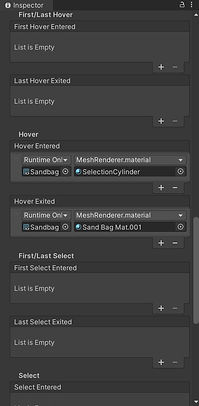
The first sandbag that was made interactable kept falling down, away from the environment. After awhile the problem had been found. It was actually because of the mesh collider that I have applied to the sandbag. Apparently, the trigger was not supposed to be ticked . When the trigger is ticked and the collider touches other object, it causes the sandbag to drop. However, after releasing the sandbag, it just floats in the air and does not stay on the ground. This also took awhile to figure out and turns out the problem was that kinematic and throw on detach cannot be ticked at the same time.
After many trials and error, the sandbags finally can be picked up and placed at the door. Unfortunately, it was unable to rotate. With only limited time left till usability testing, there was no choice but to leave it this way first.


After the usability testing, an extra feature has been added to the sandbags. An XR socket has been created and placed near the door for the sandbags. Now if the player approaches the main door while holding the sandbag and lets go the sandbag, it will immediately rotate and placed nicely on the door. This feature have solved the rotation problem.

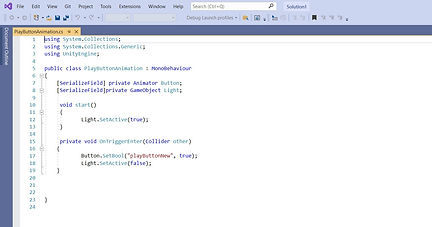
Another feature that have been added to the first floor is that the main switch now can off the lights in the environment. The main switch has a trigger that detects the left hand, plays an animation and turns off the light. The following image is the updated script for the switch
Subtitle Trigger


A trigger have been implemented near the start area. When the players goes through the trigger a subtitle would appear to inform the players on what to do. The subtitle will also be accompanied with the voice of the teenager's mother. I placed the trigger near the starting point so when the players start to walk, the subtitle will appear.
Gameplay Walkthrough
Prototype 1
The purpose of the first prototype was to record for the teaser and for the Grad X trailer video. The prototype consists of first floor view and the second floor view. In the making of the first floor, objects were unable to grab and kept falling. The lighting for the first prototype has been adjusted to look as if the scene is played during the evening. This prototype was also used in the usability testing after few changes were made.

Prototype 2
The second prototype have included cutscenes. The main switch now has animation and could off lights. XR socket was also implemented so that it is easier for the players to accurately placed the sandbags. It is also easier to trigger the message. This prototype was also used to show our progress to the team's supervisor.
